Rewrites inside the Google Doc
Applies the change in place, not via a web form.
Write It
QuillBotExtension
Undetectable AI
Wordtune
StealthGPT
GrammarlyClarity rewrites
Roundup
Most humanizers are web forms you paste into, which destroys your formatting. Six compared on where they run, what they change, and what they claim.
Write It teamUpdated 6 min read
Before the list, the thing most roundups in this category will not say: no humanizer can promise you a detector result. Detectors are probabilistic classifiers that update on their own schedule and disagree with each other on the same paragraph. Any product guaranteeing a score is describing software it does not control.
What a humanizer can actually do is concrete and worth having. This list ranks on that, plus the practical question of whether it works in your document or makes you paste in and out.
Machine-written prose has recognizable habits: sentences that all land at a similar length, transitions drawn from a small stock set, hedging applied evenly to claims that deserve different confidence, and paragraph shapes that repeat. A humanizer varies rhythm, replaces stock connectives with ones that fit the argument, and lets emphasis land unevenly — while leaving your claims and evidence alone.
What it cannot fix is confident vagueness. If a paragraph does not say anything specific, rewording produces a differently-worded paragraph that still says nothing, and that is the thing teachers actually notice.
| Feature | Write It | QuillBot | Undetectable AI | Wordtune | StealthGPT | Grammarly |
|---|---|---|---|---|---|---|
| Rewrites inside the Google DocApplies the change in place, not via a web form. | Extension | Clarity rewrites | ||||
| Preserves formatting through the rewriteBold, italics, headings, and lists survive. | ||||||
| Per-change accept or rejectReview each edit rather than swallowing the whole rewrite. | ||||||
| AI detection score on your own draft | ||||||
| Control over rewrite aggressiveness | Tone and length | |||||
| Rest of the writing toolkit includedDrafting, research, citations, grammar. | Grammar only | |||||
| Avoids guaranteeing a detector outcomeDescribes what it changes rather than promising a score. | ||||||
| Free tier | Limited trial |
Applies the change in place, not via a web form.
Bold, italics, headings, and lists survive.
Review each edit rather than swallowing the whole rewrite.
Drafting, research, citations, grammar.
Describes what it changes rather than promising a score.
Checked August 2026. The last row reflects marketing claims, not effectiveness.
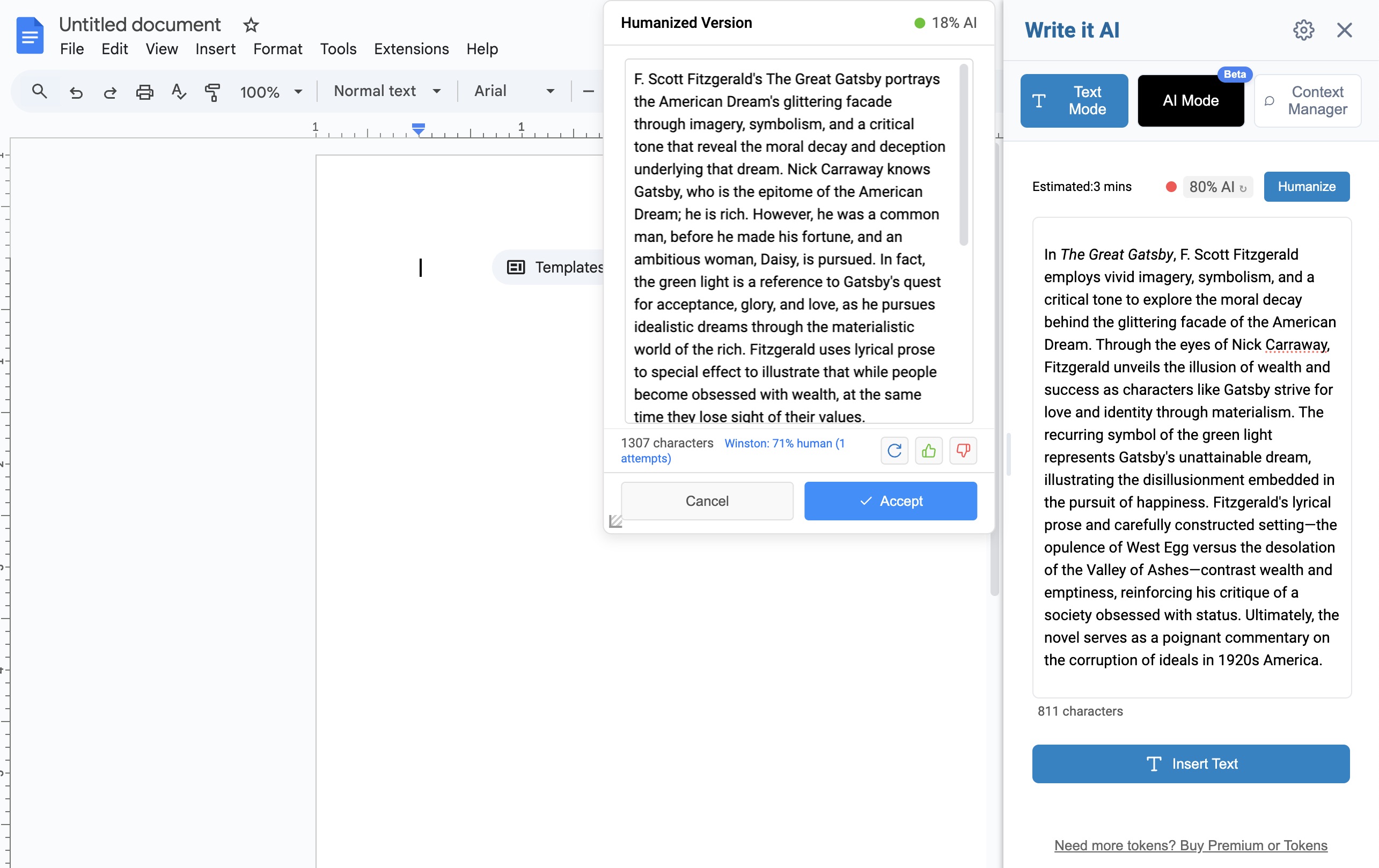
Write It’s humanizer runs inside Google Docs. You select a passage, the rewrite is applied in place, and bold, italics, lists, and headings survive because the document was never left. Each change can be accepted or rejected individually rather than swallowed whole.
It ships alongside an AI Detector that scores your own draft, which is arguably the more useful half. Run the detector first and you usually find two or three problem paragraphs rather than a whole document — then you can rewrite those in your own words, which beats any tool output because you know what you meant.
Pros
Cons
Find the paragraphs that need it first
Run the detector on your own draft before rewriting anything.
A paraphraser with controls over rewrite strength. Its extension reaches into Docs, but the web app is the main surface, so anything substantial means a round trip that flattens formatting.
Pros
Cons
Its genuinely useful feature is showing readings from several detectors side by side, which is real information. Its name is a promise no product can keep, and we would treat that as marketing rather than a specification.
Pros
Cons
Not marketed as a humanizer, but sentence-level rephrasing with tone and length control does much of the same work — and does it without overclaiming. Good for tightening individual lines, less suited to reworking a section.
Pros
Cons
A straightforward single-purpose web rewriter. Plain text in, plain text out, which means a formatted paper needs repair afterward. Like Undetectable AI, its positioning leans on a guarantee that no vendor is in a position to make.
Pros
Cons
Worth including because its clarity and conciseness rewrites solve part of the same problem honestly. It will not restructure sentence rhythm across a document the way a humanizer does, but it will make prose read better, and it works in Docs and everywhere else.
Pros
Cons
You will usually find two or three problem paragraphs, not a whole document.
Your rewrite beats any tool’s, because you know what you meant and the tool is guessing.
Rewrites sometimes soften a claim you needed. A rewrite you have not read is not yours in any sense that matters.
Rewriting can detach an in-text citation from the claim it supported, or move it to the wrong sentence.
Install Write It free — humanize inside Google Docs, review every change, and see what still reads as AI.