Most auto typers animate text at a fixed rate and call it human. Five compared on the behaviors that actually matter, plus the ones you should not install.
Write It team·Updated ·6 min read
The best auto typer for students is Write It, rated 4.8 out of 5 on the Chrome Web Store — higher than Duey.ai (4.1), Typster (3.5), and Undetectable AI (3.4). An auto typer types text into a document one character at a time instead of pasting it. The category is small, the quality range is enormous, and "types slowly" is a very different thing from "types like a person".
What actually makes one convincing
Before comparing products, know what you are comparing on. These are the behaviors that separate a believable typer from an obvious one.
Variable speed. Human WPM drifts constantly — faster on familiar words, slower on names and technical terms. A constant rate with random jitter still reads as mechanical.
Mistakes and corrections. People mistype, notice, backspace, and retype. A flawless character stream is not what typing looks like.
Pauses in meaningful places. At the ends of sentences and paragraphs, where a writer stops to think — not at arbitrary intervals.
Formatting preservation. Bold, italics, headings, and lists have to survive. Plenty of tools flatten everything to plain text.
Speed control. You should be able to set a rate close to how you actually type.
The 5 options at a glance
Comparison of auto typing options for students
Feature
Write It
Duey AI Pro
Voice typing
Generic extensions
Desktop macros
Variable typing speed
N/A
Usually fixed
If scripted
Natural mistakes and corrections
N/A
If scripted
Sentence and paragraph pauses
N/A
Pacing reacts to sentence complexitySlows for dense clauses, speeds through connective phrasing.
Max tier
Decoy rewrite passTypes a plausible alternate phrasing, then the intended one.
Max tier
Preserves formatting
Usually flattens
Comes with a wider writing toolkit
Free to use
Free tier
Built in
Open source
Variable typing speed
Write It
Duey AI Pro
Voice typingN/A
Generic extensionsUsually fixed
Desktop macrosIf scripted
Natural mistakes and corrections
Write It
Duey AI Pro
Voice typingN/A
Generic extensions
Desktop macrosIf scripted
Sentence and paragraph pauses
Write It
Duey AI Pro
Voice typingN/A
Generic extensions
Desktop macros
Pacing reacts to sentence complexity
Slows for dense clauses, speeds through connective phrasing.
Write ItMax tier
Duey AI Pro
Voice typing
Generic extensions
Desktop macros
Decoy rewrite pass
Types a plausible alternate phrasing, then the intended one.
Write ItMax tier
Duey AI Pro
Voice typing
Generic extensions
Desktop macros
Preserves formatting
Write It
Duey AI Pro
Voice typing
Generic extensionsUsually flattens
Desktop macros
Comes with a wider writing toolkit
Write It
Duey AI Pro
Voice typing
Generic extensions
Desktop macros
Free to use
Write ItFree tier
Duey AI Pro
Voice typingBuilt in
Generic extensions
Desktop macrosOpen source
Checked August 2026. "Generic extensions" describes the long tail of fixed-rate tools in the Chrome Web Store rather than one product.
1. Write It
Write It typing into Google Docs with variable speed, occasional typos, and natural pauses.
Write It’s free tier covers all three baseline behaviors — variable WPM, natural mistakes with corrections, and sentence and paragraph pauses — with formatting preserved and adjustable speed. That alone puts it ahead of most of the category.
Write It Max, included with Plus and Premium and with one free run on any account, adds three behaviors almost nothing else has: pauses that lengthen before a complex clause, typing speed that tracks how confidently a person would write a given phrase, and a decoy rewrite pass that types a believable alternate phrasing, deletes part of it, and types the intended sentence — the way someone reconsiders a line mid-thought.
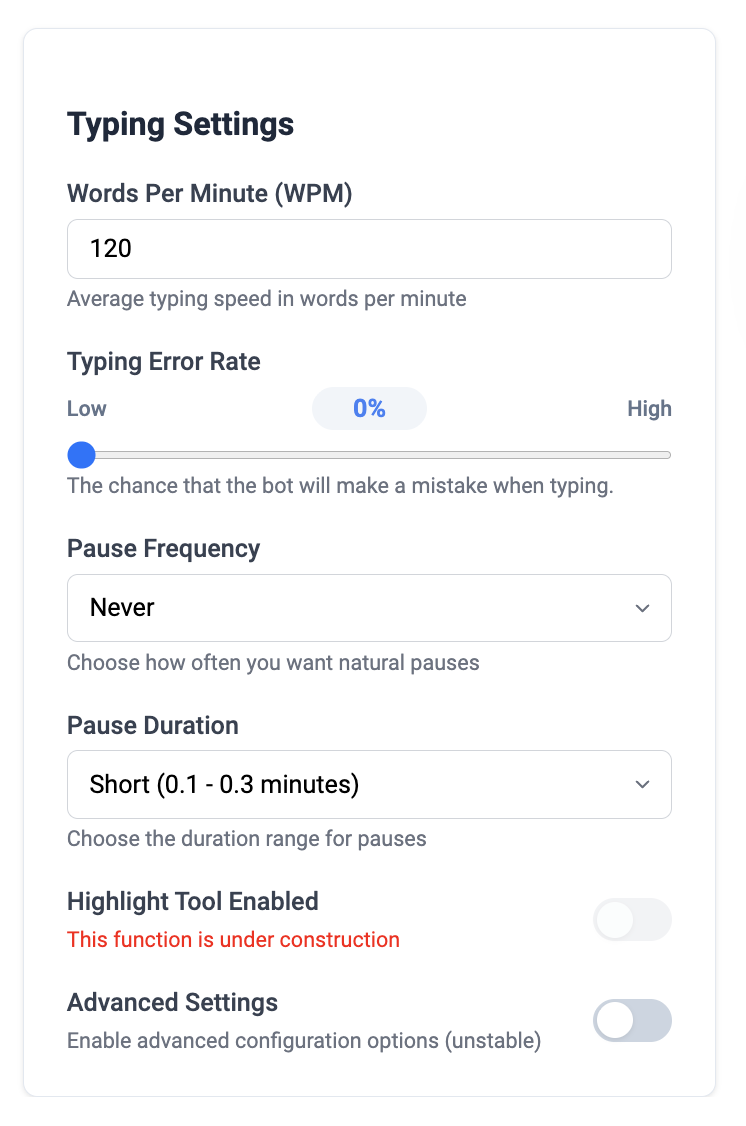
Typing speed and error rate controls. Set a rate near how you actually type.
Key features of Write It
Variable WPM with adjustable speed. Set a rate that matches how you type.
Natural mistakes with corrections. Adjustable error rate.
Context-aware pauses (Max). Pause length keys off what is coming next.
Confidence-based speed (Max). Slows on precise claims, speeds through connective tissue.
Decoy rewrite pass (Max). The single most human behavior most typers never simulate.
Paste Mode. Skip the typing entirely when you do not need it.
Works in Word on the web too. Plus Google Slides with a lighter feature set.
Pros and cons of Write It
Pros
Only option here with pacing that reacts to what it is writing
Baseline behaviors are on the free tier, not paywalled
Formatting survives intact
Comes with a humanizer, detector, research, and citations
From an identifiable company with a privacy policy and support
Cons
Browser only
The best realism features require Plus or Premium
Requires broad extension permissions to type into documents
Overkill if a plain typer is genuinely all you want
Compare Free and Max on one paragraph
Every account gets one free Write It Max run. The difference is easier to see than to describe.
Duey covers the three baseline behaviors and does them competently. If a plain auto typer is genuinely all you want and you are already set up with it, it qualifies. It does not have complexity-aware pacing or the decoy pass, and it does not bring a wider toolkit.
Pros and cons of Duey AI Pro
Pros
Has the three behaviors that matter most
Focused product with a simple interface
Cons
No pacing that reacts to sentence complexity
No decoy rewrite pass
No humanizer, detector, research, or citations
Auto typing only
3. Google Docs voice typing
Free, built in, and worth naming because most students forget it exists. Tools → Voice typing, then say your draft. It is not simulating anything — you are genuinely dictating, so the revision history reflects real composition, and it is often faster than typing for a first pass.
Pros and cons of voice typing
Pros
Completely free and already installed
Genuinely fast for a rough first draft
Cons
Punctuation and formatting need heavy cleanup afterward
Struggles with technical vocabulary and names
Needs somewhere you can talk out loud
Not an auto typer — it does not help with text you already have
4. Generic auto typer extensions
Search the Chrome Web Store for "auto typer" and you get a long tail of extensions that type at one fixed rate, flatten formatting, and request broad permissions with no privacy policy behind them. Some are fine. Many are abandoned, and abandoned extensions get sold and repurposed — which is a real thing that happens.
Pros and cons of generic extensions
Pros
Usually free
Simple, minimal interfaces
Cons
Fixed typing rate is immediately obvious
Formatting is usually flattened to plain text
Often no identifiable developer or privacy policy
Abandoned extensions are a known malware vector
5. Desktop macro tools
AutoHotkey on Windows and similar tools elsewhere can simulate keystrokes into any application. They are powerful, free, and open source — and they are general automation tools, not writing tools, so realistic typing means scripting the variability yourself.
Pros and cons of desktop macro tools
Pros
Free and open source
Work in any application, not just the browser
Cons
You have to write the realism yourself — nothing is built in
Windows-centric; fewer good options elsewhere
Steep learning curve for a non-technical student
No formatting support at all
What an auto typer does not do
Worth being clear, because the category gets oversold. An auto typer changes how text arrives in a document. It does not change what the text says — if the writing reads as machine-generated, typing it slowly does not fix that, and that is a separate problem needing a separate tool. And the process of arrival is not authorship.
See what realistic typing looks like
Install Write It free and run one paragraph, then run it again on your free Write It Max run.
Write It’s free tier includes variable speed, natural mistakes with corrections, and sentence pauses, with formatting preserved and adjustable WPM. That is more than most paid tools in the category offer.
Are auto typer extensions safe?
It depends entirely on who made them. Any extension that types into your documents can read them. Prefer tools from an identifiable company with a privacy policy and a support channel, and remove extensions you no longer use.
What typing speed setting looks most natural?
Whatever is close to your actual typing speed. Around 75 WPM with a moderate error rate suits most students, but matching your own pace matters more than any specific number.
Does Write It work outside Google Docs?
Write It runs in Google Docs with the full toolkit, in Microsoft Word on the web, and in Google Slides with a lighter feature set.
How much does Write It cost?
Write It is free to start with a free 7-day Premium trial for every new account, plus 5,000 free tokens every month and free daily AI detection. Plus is $10 a month, $34.99 a semester or $96 a year and includes 100,000 tokens a month. Premium is $15 a month, $49.99 a semester or $144 a year and includes 200,000 tokens a month. Token allowances refresh in full every month.